Notifications
InfoLobby notifies you when records, tables, or comments you're following change. Notifications show up in the bell menu in the top-right corner and, if you don't check in, are rolled up into an hourly email digest.
Following a table
Open any table and click the ellipsis (…) in the top-right corner, then pick Follow. From then on you'll get a notification whenever anyone else in the workspace creates a new record in that table.
Following a table is about staying on top of new records — you won't be notified of every edit, delete, or comment on every record. To follow a specific record's full activity (updates, deletes, comments), follow that record (see below). Records you create or touch are followed automatically.
To stop following, open the same menu and pick Unfollow.
Read Only members can follow tables too — the option is always available, regardless of your role.
Following a single record
Open a record, click the ellipsis (…) in the top-right of the record view, and pick Follow. You'll get notifications for changes to that record only, not the rest of the table.
Automatic follows
You don't have to click Follow for every record — InfoLobby subscribes you automatically in several cases:
- Tables you create. Creating a table auto-follows it.
- Records you create or edit. Any record you touch is auto-followed at the record level.
- User-field mentions. If someone assigns you to a user field on a record (e.g. "Assigned to"), you're auto-subscribed to that record. Removing you from the field does not unsubscribe you — you'd have to unfollow manually.
@-mentions in comments. If someone@mentionsyou in a record or task comment, you're auto-subscribed to that record / task and you receive a dedicated "you were mentioned" notification rather than a generic comment one.
Managing followers (admins)
If you're an Admin of a workspace, you can see who follows a table and add or remove followers for other members - handy for making sure a whole team gets notified about a table without asking each person to follow it.
Open the table, click the ellipsis (...) in the top-right corner, and pick Manage Followers. A window lists every workspace member with a checkbox showing whether they follow the table. Tick a member to start their follow, or untick to stop it. Changes apply immediately.
This only affects table-level follows. Members aren't told they were added - they simply start receiving the table's notifications. Non-admins don't see this option.
Reading notifications
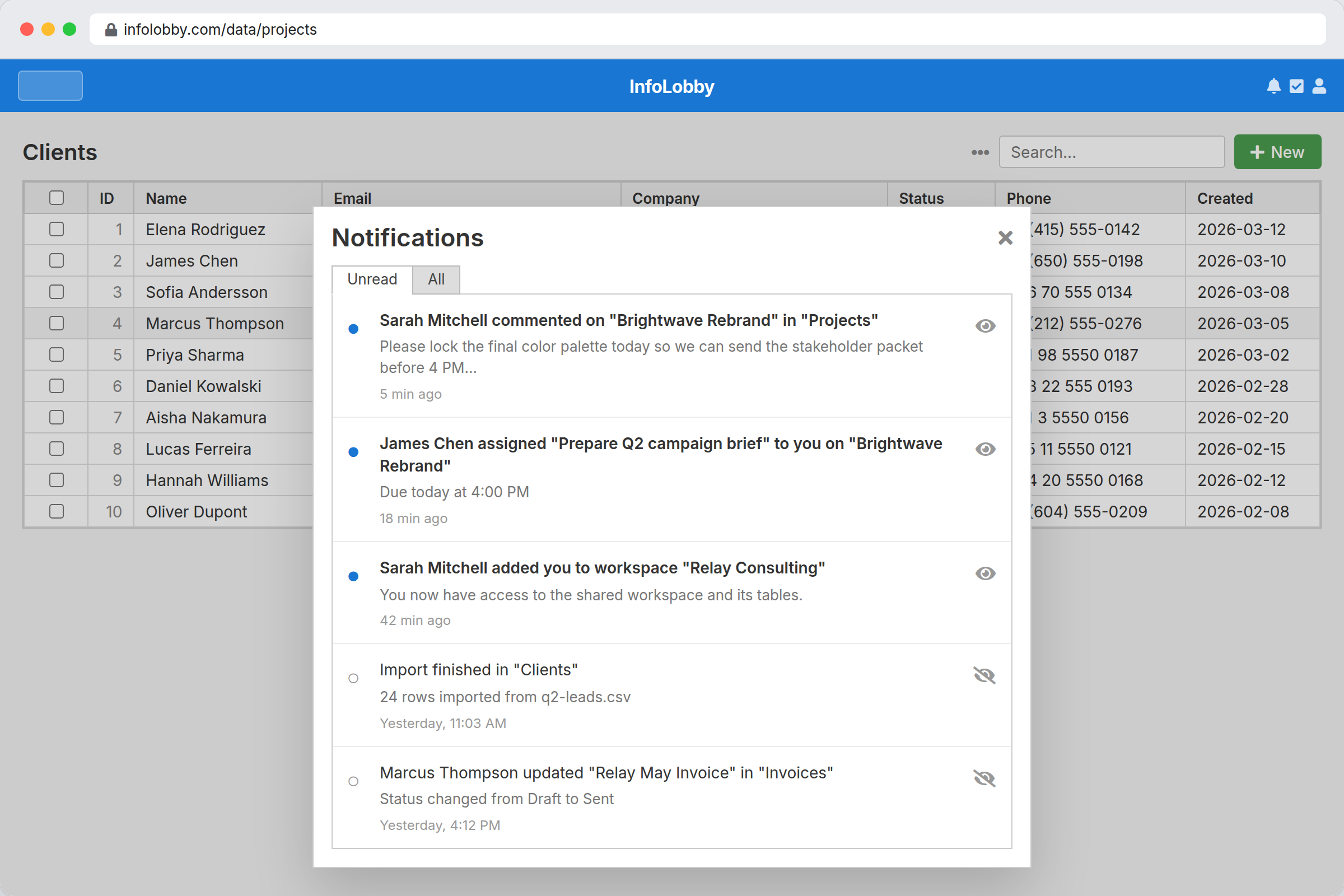
Click the bell icon in the top-right of any page. A panel opens with two tabs:
- Unread — notifications you haven't dismissed yet
- All — everything, including already-read
Each row shows who did what, when, and a link to the record. Click the row to jump to the record — opening it automatically marks all its notifications as read.
You can also use Mark read / Mark unread on any row, or Mark all as read from the Unread tab.
When you have unread notifications:
- The bell icon fills in solid
- A red badge shows the count (capped at
99+) - The browser tab title gets a
(N)prefix - The favicon gets a small red dot
All four indicators clear when your unread count drops to zero.
You never notify yourself
You won't receive notifications for your own actions. If you create, update, delete, or comment on a record, only other followers get notified.
The one exception: if an import you started fails, you're notified — you're the only person who cares.
Silent automation actions
An automation (flow) can make changes silently. When the Silent option is checked on a Create, Update, Delete, Add Comment, or Generate PDF action, that change notifies no followers — useful for routine or bulk updates you don't want to flood people with. The change still happens and still shows in activity history. People you @mention and users newly assigned to a record are still notified. See Automations.
Imports
Running an import produces exactly one notification per table follower: "Alice imported leads.csv into Leads". You won't get a notification for every row. If the import fails, only the person who started it is told.
Email digests
If you have unread notifications and haven't checked the bell, InfoLobby sends you a summary email once an hour at most. The email lists each notification with a link to the record. Once a notification is included in a digest email it's marked as "seen" — the in-app bell will still show it until you actually read or dismiss it, but it won't appear in your next digest.
To turn off the digest email, open Profile from the user menu and tick Disable missed notification emails. The bell, badge, and tab indicators still work — only the hourly email is suppressed.
Leaving a workspace
When you're removed from a workspace (or leave it yourself), your subscriptions and notifications for that workspace are deleted. Your follows in other workspaces are unaffected.